Check any website’s health
in one click
SiteCheck audits SEO, performance, structure, AI visibility, FAQ markup and security on any page — and tells you, in plain English, exactly what to fix.
Everything that makes a site win or lose
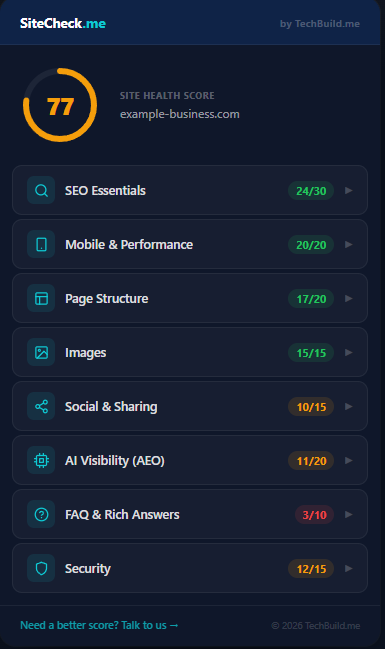
One scan grades the whole picture — the classic SEO and performance basics, plus the three things most checkers miss: how visible you are to AI, whether your FAQs are marked up for rich answers, and your security posture.
SEO Essentials
Title, meta description, canonical, structured data, language and content depth — the fundamentals search engines rank on.
Mobile & Performance
Viewport and HTTPS — the make-or-break basics for mobile visitors and Core Web Vitals.
Page Structure
A single clean H1, supporting H2s, favicon and indexability — how crawlers actually read the page.
Images
Alt-text coverage across every image, for accessibility and image search.
Social & Sharing
Open Graph and Twitter cards, so shared links look sharp instead of plain.
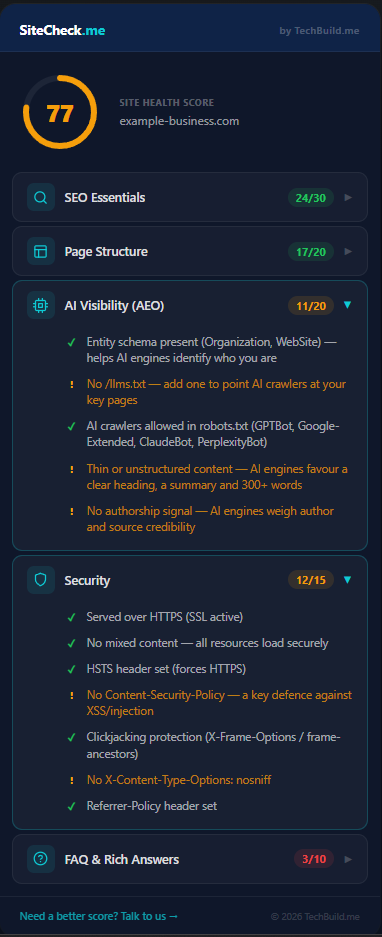
AI Visibility (AEO)
Entity schema, llms.txt, AI-crawler access and answerable content — how ready you are to be cited by ChatGPT, Gemini and Perplexity.
FAQ & Rich Answers
FAQPage schema and on-page Q&A — the content that wins rich results and voice/AI answers.
Security
HTTPS, mixed content and the response headers (HSTS, CSP, clickjacking protection) that keep visitors safe.
From install to fix in under a minute
Install it free
Add SiteCheck to Chrome from the Web Store. No account, no card, no setup.
Click on any page
Open any website — yours, a competitor’s, a prospect’s — and click the SiteCheck icon. It reads the live page instantly.
Fix what’s failing
Get a scored breakdown across all eight categories, each item in plain English with exactly what to fix and why it matters.
Built for owners, not just developers
You don’t need to be technical. Every failed check explains what it means and what to do about it — so you can tell whether your site (or the one a developer just handed you) actually covers the basics that drive traffic and leads.
- Evaluate a developer’s work before you pay the final invoice
- Audit a prospect’s site before a sales call
- Spot-check a competitor’s SEO and AI readiness
- Confirm a new blog post shipped with the right meta and schema
No sign-up, no API keys, no data leaves your browser. Install it and scan your first page in seconds.
Add to Chrome — FreeCommon questions
Is SiteCheck really free?+
Yes — completely free, with no account or sign-up. Install it and start scanning.
Does it work on any website?+
Any public page — your own site, a client’s, or a competitor’s. It reads the live page directly in your browser, so there are no API keys and nothing to configure.
Can it tell me if my site is visible to AI?+
It checks the signals that make a page citable by AI engines like ChatGPT, Gemini and Perplexity — entity structured data, an llms.txt file, whether robots.txt blocks AI crawlers, and whether your content is clear enough to quote. It measures AI-readiness; it can’t see actual citations, because no browser tool can.
What does the security check cover?+
HTTPS, mixed (insecure) content on secure pages, and your response headers — HSTS, Content-Security-Policy, X-Frame-Options and more — flagged with the fix for each.
Will it slow down my browser?+
No. SiteCheck only runs when you click it, reads the current page, and then does nothing until you click again.
Run your business on
software that works.
Explore the products, or get in touch — we'll help you find the right fit for how you work.
Or reach us directly:
hello@techbuild.me